 Geld Apps
In short: Geld prints to ESC/POS thermal receipt printers over Bluetooth, USB or Wi-Fi/LAN. These are the small billing printers most Indian shops use. Pair the printer once, then every bill prints with one tap.
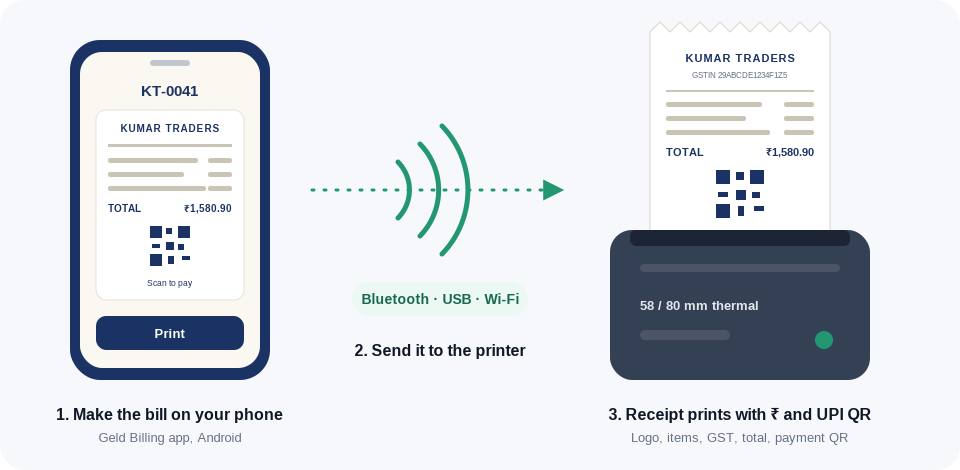
Supported printers and connections
| Type | Details |
|---|---|
| Paper width | 58mm (2 inch) and 80mm (3 inch) thermal rolls |
| Bluetooth | Pair in Android settings, then choose the printer in Geld |
| USB | Through an OTG cable from the phone |
| Wi-Fi / LAN | Network printers on port 9100 |
| A4 / A5 | Any printer Android can print to, or save as PDF |
What prints on the receipt
- Your logo, shop name, address, phone and GSTIN
- Items, quantities, rates, discounts and GST, with the ₹ sign
- A UPI QR with the amount filled in
- Your footer note and social handles
- Counter slips and payment receipts with a Code 128 barcode. Scan one later to open the bill.
- Price labels with barcodes, on label rolls or A4 sheets (24 per page)
Set up your printer
- Turn the printer on and pair it in your phone's Bluetooth settings (or plug it in by USB, or connect it to the same Wi-Fi).
- In Geld, open printer settings, pick the printer and choose 58mm or 80mm.
- Print a test receipt, then bill as usual. Each bill prints with one tap.
Built for busy counters
- Shared print station: one phone near the printer prints bills made on linked staff phones.
- Automatic retry when the printer is busy, and reprint any bill from history.
- Works offline: printing never waits on the internet.
Thermal printing questions
Will my cheap Bluetooth printer work?
Most likely. Most 58mm and 80mm billing printers sold in India use ESC/POS, which Geld supports. If yours does not print, write to us with the model name.
Does the ₹ sign print correctly?
Yes. Geld prints the rupee sign, your logo and the UPI QR on thermal receipts.
Is printing free?
Yes. Printing, like every Geld feature, is free.
See more
Free GST billing app · Invoice maker app · Printing features · FAQ