 Geld Apps
In short: Geld is a free billing app for Indian shops and service businesses. It works out GST on each line after discount, prints your GSTIN on every bill and titles the A4 bill Tax Invoice. You can print it, share it as a PDF, or show a UPI QR so the customer pays on the spot.
What you get for GST billing
- GST rate per item or service. Use different rates for different items on the same bill.
- GST after discount. Line and whole-bill discounts, in rupees or percent, are taken off before GST is worked out.
- Your GSTIN on every bill. Once it is in your shop profile, the A4 bill is titled Tax Invoice.
- Automatic invoice numbers (INV-0001, INV-0002…). Each staff phone has its own series, so numbers never clash.
- Thermal and A4 printing. Use 58mm and 80mm Bluetooth, USB or Wi-Fi printers, or any printer Android can use for A4 and A5.
- Share as PDF or image on WhatsApp or any app.
- CSV export for your accountant: bills, payments, expenses, customers and items, ready for Excel or Google Sheets.
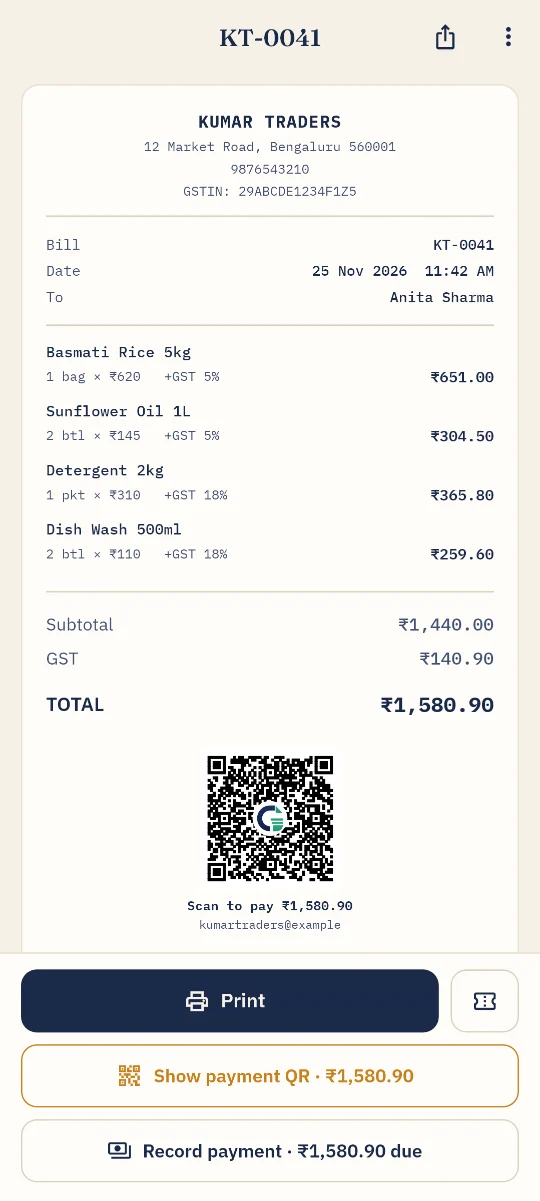
A GST bill in Geld
Each item carries its own GST rate. Here rice and oil are at 5% and detergent and dish wash at 18% on the same bill. Geld adds up the subtotal, the GST and the total for you, and prints your GSTIN at the top.
With a GSTIN set, the A4 version of this bill is titled Tax Invoice. Unpaid bills also get a UPI QR so the customer can pay on the spot.
Make your first GST bill
- Install Geld and enter your shop name, address and GSTIN.
- Add your items or services with a price and GST rate. You can also add them while you bill.
- Tap items, or scan a barcode, to build the bill. Add a discount if you like.
- Save it as paid (cash, UPI or card) or leave it unpaid against a customer.
- Print it, share it as a PDF, or show the UPI QR.
Why a free app and not paid billing software?
Most small shops don't need a desktop billing package or a monthly plan. They need correct GST bills, fast printing and a record of who owes them money. Geld does that on the Android phone you already have. Your data stays on the phone, and you can back it up to your own Google Drive.
Questions about GST billing
Is Geld really free?
Yes. Every feature is free to use. Geld is supported by ads.
Can I use different GST rates on one bill?
Yes. Each item has its own rate, so one bill can have items at 5%, 12%, 18% or any other rate.
Do I need a GSTIN to use Geld?
No. Without a GSTIN you can still make bills and invoices. With a GSTIN, it is printed on your bills and the A4 bill becomes a Tax Invoice.
Does it work without internet?
Yes. Billing, printing and reports all work offline.
See more
Invoice maker app · Billing with a thermal printer · All features · FAQ