 Geld Apps
In short: Geld is a free invoice generator for Android. You set up your letterhead once. After that, every invoice looks professional, is numbered automatically, and can be printed on A4 or thermal paper or sent on WhatsApp as a PDF. It suits shops, traders, freelancers and service providers.
An invoice that looks like your business
- Your letterhead: logo, business name, address, phone, email, website and GSTIN.
- Social handles: Instagram, Facebook, WhatsApp and YouTube on one line.
- Footer note for terms, bank details or a thank-you line.
- No forced branding: turn off the small "Billed with Geld" line.
- UPI QR with the amount and invoice number filled in. It works with any UPI app, and the money goes straight to you.
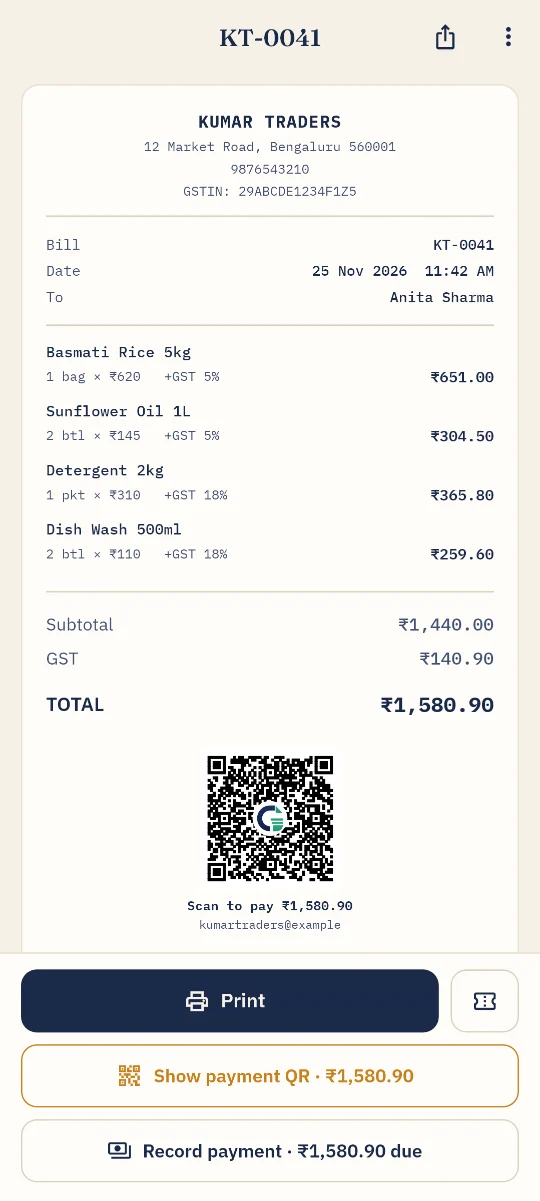
What an invoice looks like
This is a real invoice in Geld Billing. Your shop name, address, phone and GSTIN sit at the top, then the invoice number, date and customer. Each line shows quantity, rate and GST, followed by subtotal, GST and total.
Under the total is a UPI QR with the amount and invoice number filled in, so the customer can pay from any UPI app straight away. From here you can print it, share it as a PDF on WhatsApp, or record the payment.
Invoice formats
| Format | Best for |
|---|---|
| A4 / A5 PDF | Formal invoices to businesses, emailed or sent on WhatsApp; titled Tax Invoice when you have a GSTIN |
| Thermal receipt | Shop counters with a 58mm or 80mm Bluetooth, USB or Wi-Fi printer |
| Image | A quick share on WhatsApp that opens instantly on any phone |
| Payment receipt | Numbered receipts (such as INV-0009/R2) when a customer pays in parts |
For services as well as products
Electricians, plumbers, repair shops, salons, tailors and consultants can invoice services with a minimum charge, and include the materials used. Materials can be listed line by line or bundled into the service.
Keep track after you send it
- Mark invoices paid, unpaid or part paid, and see what each customer owes.
- Search past invoices by customer, number or amount.
- Reports show what you billed, what you collected and what is still owed.
- Export everything as CSV for your accountant.
Questions about making invoices
Is the invoice maker free?
Yes. Every feature in Geld is free to use, with no limit on invoices. The app is supported by ads.
Do I need an account?
No. You can make invoices on one phone without signing in. Google sign-in is needed only for Drive backup and linking staff phones.
Can I make invoices offline?
Yes. Making, printing and sharing invoices all work without internet. Sharing on WhatsApp needs a connection to send, of course.
Is it available on iPhone or computer?
Not at present. Geld is an Android app (Android 7.0 or later).
See more
Free GST billing app · Billing with a thermal printer · All features · FAQ